Share your veterinary photos!
The AVA is developing a national public awareness campaign to showcase the extraordinary breadth of veterinary work and the important contribution you make to Australian society.
A key initiative under AVA’s 2025–2028 Strategic Plan, the campaign aims to challenge public perceptions of what veterinarians do, highlighting the expertise, diversity and value of our profession.
We need your help to bring the campaign to life.
We’re looking for authentic, visually striking photographs of veterinarians/veterinary teams in action, particularly those capturing unusual, challenging or unexpected aspects of veterinary work. From wildlife conservation and biosecurity to public health, food production, emergency response and complex clinical care, we want to show Australians just how much veterinarians do.
If you have photographs that help tell this story, we’d love you to share them for consideration in the campaign. Images selected for use may feature in advertising across digital, social media and other channels.
Please note: both the photographer and any identifiable people in the photo will be required to complete a consent form. More details are at the end of this webpage.
What makes a great photo?
Look for:
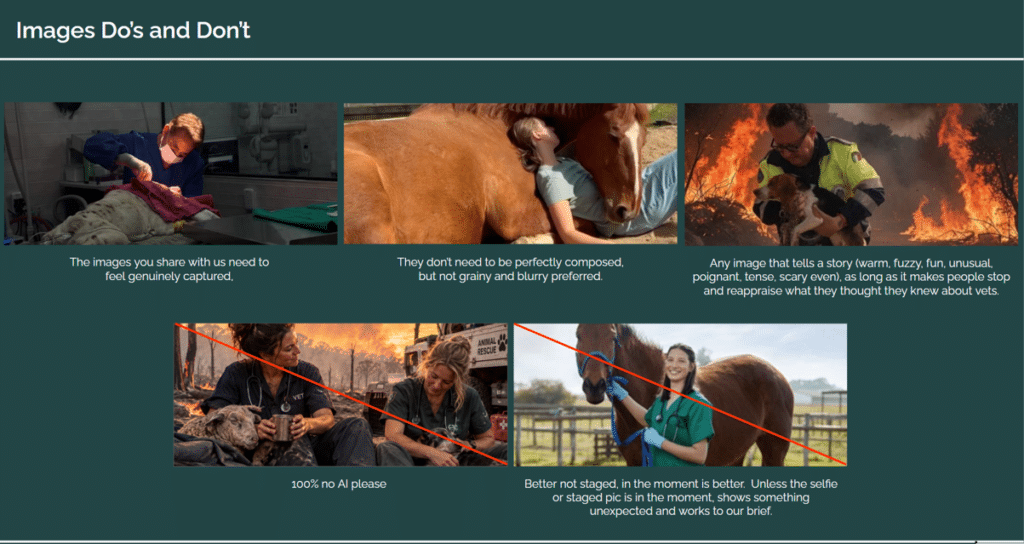
- Authentic, genuinely captured moments.
- Clear, good-quality images that aren’t grainy or blurry.
- Images that tell a story and challenge perceptions of the veterinary profession.
Please avoid:
- Heavily staged or overly posed photographs. We prefer authentic, in-the-moment images.
- AI-generated images.
Having trouble uploading your photo?
Each individual photo can be up to 50MB, which is a generous allowance for standard photo submissions. Most photos taken on a smartphone or digital camera will fall well within this limit, so resizing your images is unlikely to be necessary.
Please only follow the instructions below if you experience difficulties uploading your photo to the form.
On a computer:
- Mac: Open your image in Preview, select Tools > Adjust Size to reduce the image dimensions, then export the image in JPEG format.
- Windows: Open your image in Photos and select Resize image from the options menu to reduce its dimensions.
- Alternatively, you can also use an online image compression tool to reduce file size such as this.
Please avoid sending screenshots of your original photo, as this can reduce image quality.
Should you have any issues or questions, please contact: communications@ava.com.au